






2020 turned out to be a complicated year in many ways. Covid-19 has hit the whole world hard, with significant repercussions on companies which, as far as possible, have found themselves having to set up suitable infrastructures for remote work. Many social initiatives were born during the year and our field, IT and cyber security, is no different.
In this article, we want to communicate what are the initiatives we support to cope with the emergency. We remember how important it is for the whole community to respect the DPCM, social distancing and the use of masks.
ownCloud for companies: Cyberfero’s social initiative
One of the main problems encountered is due to a lack of funds to support the remote work of its employees. In fact, it is not as simple as you might think to set up a consistent and secure system for sharing files and data for your employees. Through the use of insecure services, corporate data is placed in a dangerous situation.
We therefore decided to offer the professional version of our ownCloud service for free to help small businesses cope with this complicated period of teleworking. The social initiative is configured as a concrete help for the implementation of innovative solutions for companies.
How to access the offer
To access the professional version of ownCloud for free, just follow the steps below:
– Access the product page via the following link: https://cloud.cyberfero.com/?cmd=cart&action=add&id=310
– Click on “Promotional Code” on the right
– Use the promotional code: “COVID-19“
More information on the offer
The offer is aimed at companies wishing to use it through the COVID-19 promotional code. No payment is required and for two months the service is available in the professional version. Following the promotional period, it is possible to decide in full freedom whether to subscribe to the service or discontinue it.
The social initiative also appears among those listed in the Smart Working section on the institutional portal of Digital Solidarity.
Folding@Home
The Folding@Home social initiative is a distributed computing project aimed at simulating the dynamics of proteins, in particular the folding process. Through the use of a particular software, it is possible to offer the computing power of a computer as an active resource for research.
The project is based on the concept of distributed computing. Basically, numerous computers interact / communicate with each other over the network in order to achieve a common goal. With this type of technology it is possible to achieve the objectives set in a relatively short time. Thanks to the subdivision of the main task into simpler sub-tasks that are distributed to the machines that are part of the project.
How does it work
Folding @ home is a project focused on disease research. The problems they solve while searching require a lot of computer calculations and need a lot of power to proceed. With the dedicated software it is possible to share with them the unused computing power, so that the project can proceed to seek potential cures.
Diseases such as Alzheimer’s disease, Huntington’s disease, cystic fibrosis, BSE (mad cow disease), an inherited form of emphysema, and many cancers are also believed to be the result of poor protein absorption. When proteins unfold incorrectly, they can clump together to form lumps. These can often gather in the brain, where they are thought to cause mad cow disease or Alzheimer’s disease symptoms. The software simulates the unfolding of proteins to study the consequences.
In the video presented here, an example of a protein deployment simulation.
Initiative for COVID-19
Folding @ Home, therefore, using a distributed computing model, has been working for research for some time. In this 2020, in which it is seriously important to speed up the time of research on Covid-19, they have decided to focus all available resources on that research. Their homepage reads:
“Together we have created the most powerful supercomputer on the planet and are using it to help understand SARS-CoV-2 / COVID-19 and develop new therapies. We need your help to continue promoting a powerful and license-free drug. Use your computer to help in the fight against Covid-19 “.
The aim is to discover and develop a free medicine (not bound by private patents) and effective in the fight against the disease. We at Cyberfero promote this social initiative and want to give you a couple of tips on how to support research.
Using a VPS
To do your part with Folding @ Home, you need to install dedicated software on the machine you intend to use. Obviously it is also possible to do this through a virtual machine that you can set up with the Cyberfero VPS service. By following the instructions you find on this page, you can set up the machine in a few minutes to use the dedicated software to share its computing power. The software is available as a template for all customers of the Cloud Server service.
By following the instructions you will contribute as part of our team, you can see the progress made by the team at this link: https://stats.foldingathome.org/team/259355
Installation on other machines
The software is available for any type of OS, downloadable from the main project page. We would also like to let you know that it is possible to join this social initiative with any computer, even the one you use daily.
The convenience of using a virtual machine is that it always remains on and does not require computing power to the machine you use to work, we think it is the best solution to support the project. For example you may want to assign free resources of your Cloud Server or Super Cloud service.
The launch video of the Folding @ Home campaign for COVID-19
Our support for territorial realities
Civil protection
Cyberfero, however, was not limited to national initiatives. We care about the territorial realities and for this reason we have been offering some services free of charge to the Civil Protection of Albinea for years, for example:
– Web hosting
– Domain
– SEO services
We also offer them specific services that can be used in certain circumstances: communication campaign, technical assistance, file exchange system, etc. We would like to give our practical contribution to such important services in the area, to maintain an active link with local associations.
Agirecon
AGiReCoN is the Young Reggiani Association Against Neoplasms and we support them for what concerns the technical IT part, but not only. Together with them, some projects are planned that have the aim of developing a web app to facilitate communication between doctors and patients.
We believe that small non-profit organizations like this one deserve to be supported, especially by local companies. Associations such as AGiReCoN sensitize the area in a concrete way. They are able to communicate effectively with a good number of people thanks to their nature of small associations, typically welcomed more warmly than international ones.
We are honored to be able to give our small contribution to AGiReCoN and to the Civil Protection of Albinea.

In conclusion
This year has brought many personal and professional challenges. Especially small and medium-sized enterprises have been hit and have had to run for cover to try not to close. We hope that the ownCloud promotional offer can help some small businesses manage their work remotely and we are sure that the Folding@Home initiative is the best way to actively intervene in research, donating some computing power.
We also invite, as far as possible, the support of the realities present in your territory. Much can be done just by offering concrete and practical rather than economic help.
Useful links:

VPS (Virtual Private Server) hosting is an opportunity made available by the Cloud Server service. The service consists in sharing (guaranteeing segregation and privacy) the resources of a physical machine with the users of the virtual machines (VM) that are at their complete disposal. Exactly as if they were physical computers.
The VPS hosting service is perfect for personal, small and medium-sized websites or e-commerce platforms. To ensure that you make the right decision for managing virtual machines remotely, it is good to understand what VPS hosting services are currently offering in general.
What does a VPS provide?
VPS is short for Virtual Private Server and is sometimes referred to as Virtual Dedicated Server (VDS), but the substance doesn’t change much. As a user of a VPS hosting service, you are given access to a virtual server. Most likely the virtual servers operate on a physical machine, the use is offered by the cloud server service. The price that users are asked to use is to have access to these machines.
As an end user, the experience is to use a dedicated machine for server use. The VPS hosting services allow you to install your preferred operating system and on the basis of that, any software you intend to use. This feature makes it extremely versatile and flexible service.
VPS hosting services – What software can be run using a VPS?
A VPS is a virtual machine, therefore it is possible to install any software capable of being run on the operating system, also installed by the user.
For example, a VPS can support one of the following situations with the respective applications:
– E-commerce
– Blog server
– Company website and internal portals
– Data exchange systems (SFTP)
– Email server (SMTPS, POPS, IMAPS)
– Centralized data storage and database software
– Over IP telephony systems (telephone exchanges)
VPS Hosting Services – The Benefits of VPS Web Hosting
There are pros and cons for VPS hosting services. While many users will not notice any performance decline in the long run, some larger websites may experience performance degradation due to the activity of other customers on the same server. However, for many businesses, a VPS cloud server service offers many benefits at a reasonable cost.
Flexible allocation of resources
VPS hosting offers dedicated resources as needed. In particular: the amount of RAM, CPU and specific disk space are assigned to the VPS according to needs. When traffic on the virtual server grows and requires more resources, you can choose to borrow additional resources.
The flexibility allowed by VPS hosting is one of the most obvious advantages. To manage this functionality, the service makes use of a type of application called hypervisor. For example, if a hosted site needs more resources to host a large number of visitors and another website on another virtual machine does not use all of its resources, the first site can borrow extra power.
Root access to customize and configure the VPS
These VPS also offer super user access to configure and make changes to your hosting environment. Admin (root, Administrator) access is not guaranteed with other agreements, such as a shared hosting plan. If there is a programmer dedicated to the management of the VPS, access as superuser is essential to facilitate the work.
A common alternative to VPS hosting for website owners is dedicated hosting. With this solution you share the server with other users. Dedicated hosting is quite popular because it offers access to the server root folder and advanced configuration. But in addition to this, VPS hosting allows you to enjoy the benefits of customizing the entire used machine.
scalability
As previously stated, VPS hosting is a middle ground between a shared server with no dedicated resources and a fully dedicated server with optimal performance. Most websites work perfectly with a VPS hosting service and require only slight increases in performance as the site and traffic increase.
The Cloud Server service offers scalability so that the available resources grow with increasing effective demand.

Vps hosting – An affordable option
VPS hosting is very convenient for website owners (and for all those who need a server) compared to buying a dedicated server. A VPS can reliably host a page or web application, as well as manage traffic peaks and grow to meet growing needs over time.
Instead of engaging in the management of a dedicated server machine, investing at least twice as much as VPS hosting, it is good to carefully evaluate the cloud server offers.
VPS hosting offers you a way to get started without a non-prohibitive startup cost.
The worst thing that could happen, if in the future the need becomes that of a dedicated server, it is that it will be necessary to migrate towards that resource. However, the initial savings with a VPS server are undeniable.
[btnsx id=”2931″]
Useful links:
SuperCloud – Virtual Datacenter – VDC

Folding@home is a distributed computing project for simulating protein dynamics – the process of protein folding and the movements of proteins implicated in a variety of cancers and diseases, including Alzheimer’s, Ebola and COVID-19.
By enabling people across the world to run these simulations on their personal computers, the Folding@home project aims to help scientists better understand these processes and identify new opportunities for treatments.
Of course, you can run Folding@home as a virtual machine in an Cyberfero cloud too. The Folding@home client is available in the Cyberfero template library, so every Cloud Server users can use it to build their Virtual Machine. Here’s a quick guide to setting it up.
1. Build a virtual server using the Folding@home template
To get started, deploy a Virtual Server using this template. Modify CPU/RAM to your liking and build the VS.
Once the VS is up and running, ssh/console to VS and confirm that the fah service is running:
      [root@folding ~]# /etc/init.d/FAHClient status

      fahclient is running with PID 1268
Edit config.xml in /etc/fahclient directory and modify it to add the <!– Remote Command Server –> section, in which we can tell the client our remote IP address. Or do as I have done in this case, and allow access from all (0.0.0.0/0) but with a password:
[root@folding ~]# cat /etc/fahclient/config.xml
With above config added, restart the fah service:
      [root@folding ~]# /etc/init.d/FAHClient restart

      Stopping fahclient ... OK

      Starting fahclient ... OK
2. Install FAHControl
Next we are going to install FAHControl to your local desktop or laptop PC. It’s a GUI for controlling one or more Folding@home clients. You can learn more and get the installer from https://foldingathome.org/support/faq/installation-guides/
Once it’s installed, launch the application and you should see something similar to this:
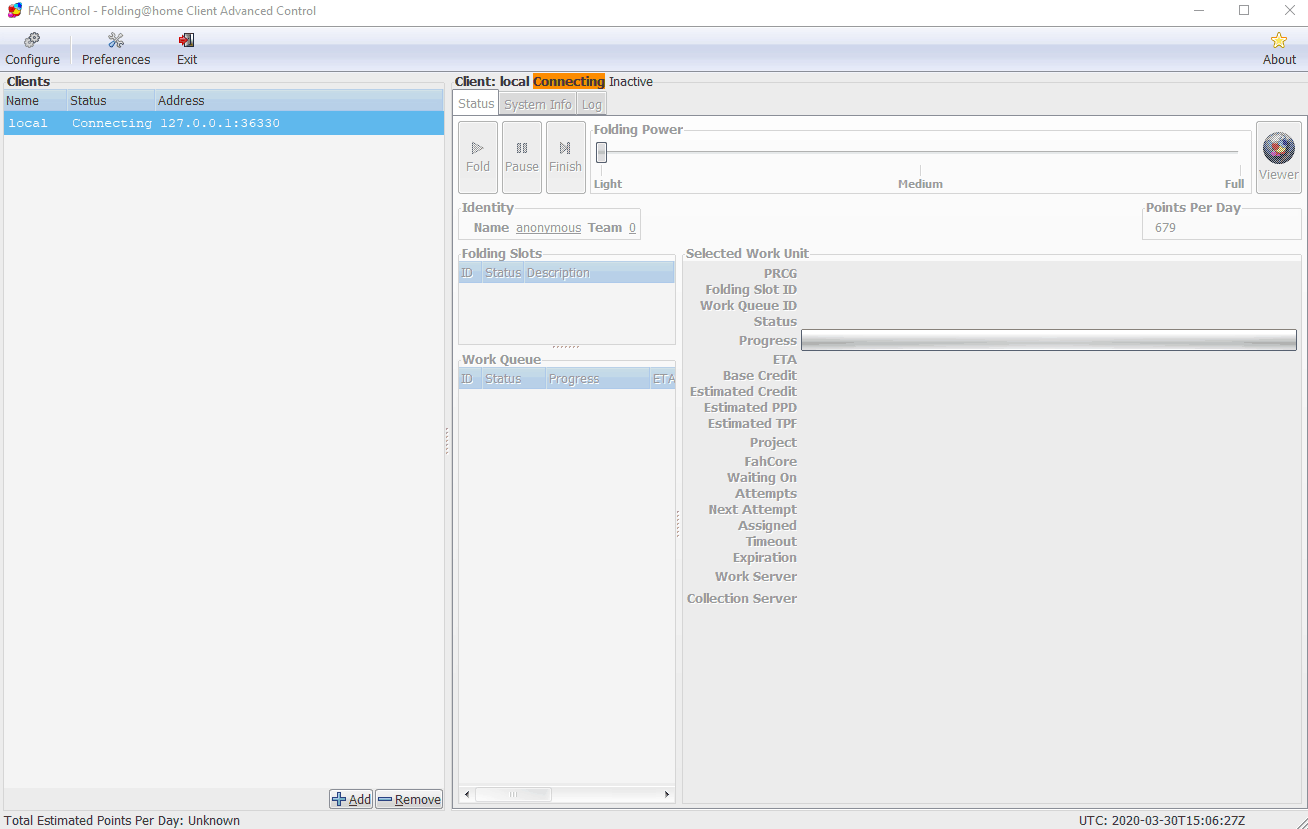
Now we can add our client running on the VS we deployed in Cyberfero. You will need the public IP address of the VS, and ensure that you can reach port 36330.
Click the small Add button towards the bottom of the FAHControl client, and provide the Display Name, Hostname/IP address and the password you set earlier.
In the Configure section, under Identity tab specify your Name and our Team Number that is 259355 as reported below:
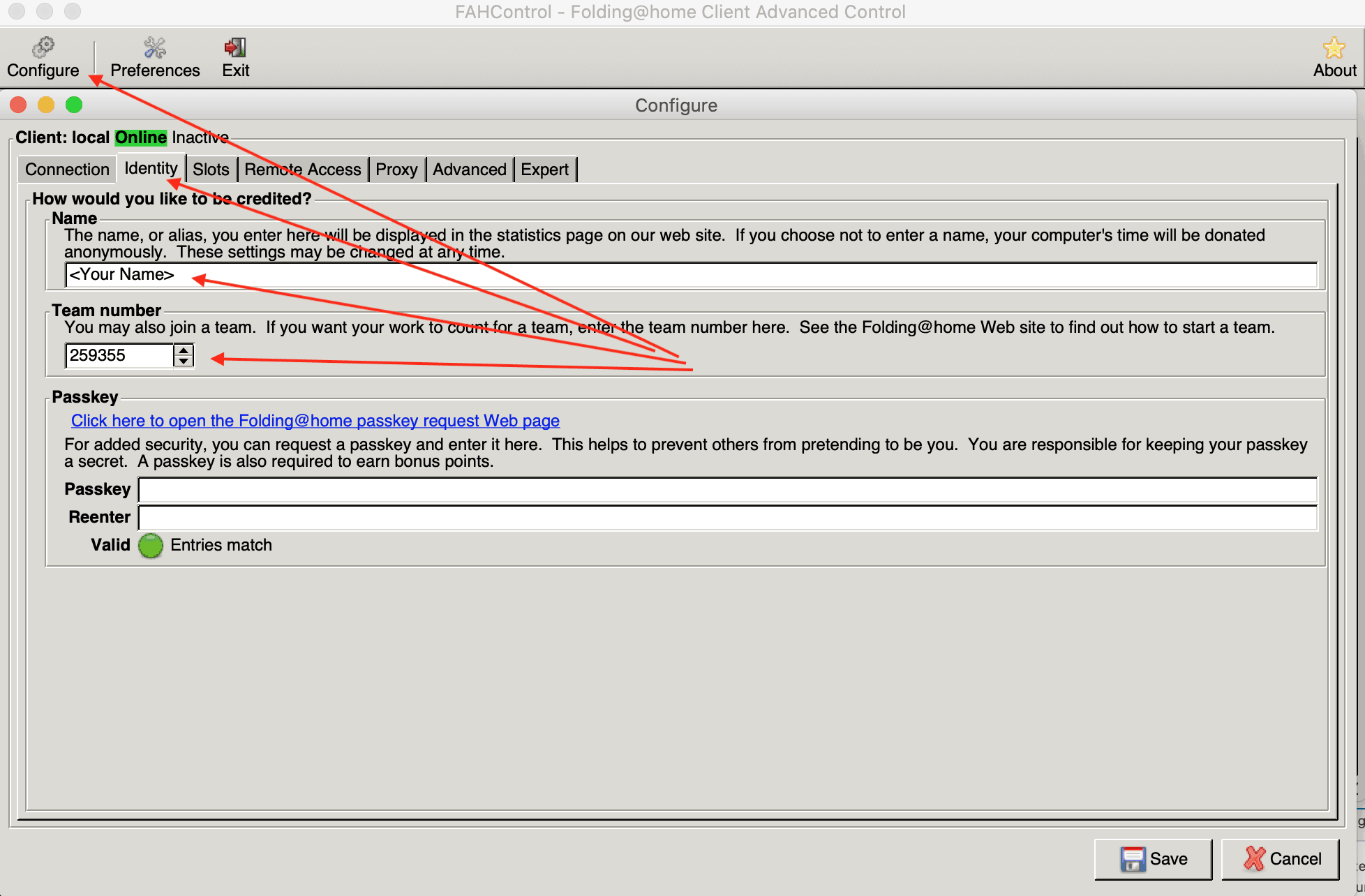
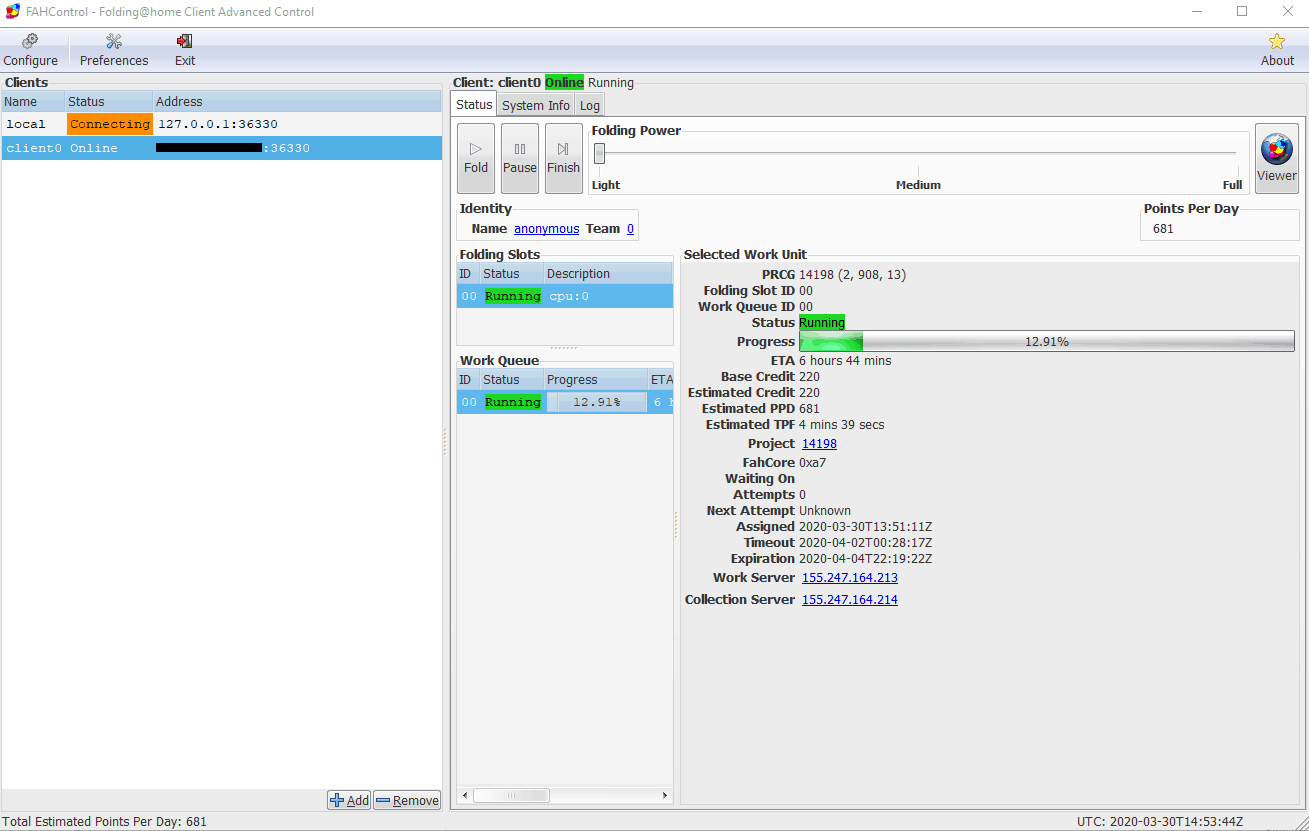
You should now see that FAHControl has connected and is working.
To find more details about how it works, and other information about the Folding@home project, visit https://foldingathome.org/.
You can check our Team stats here: https://stats.foldingathome.org/team/259355 including your contribute.
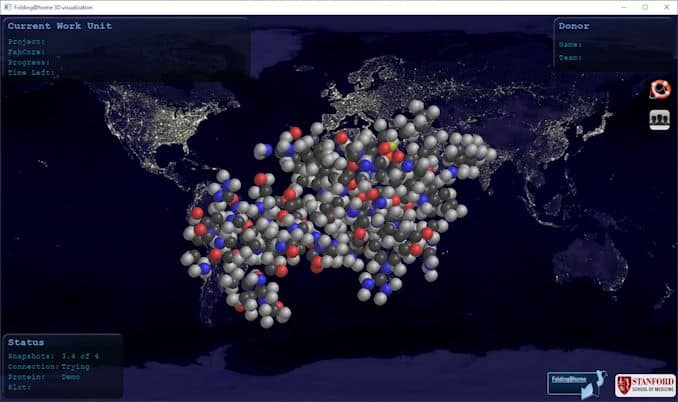
Please note that for help Folding@home project it is not mandatory to create a VPS on our Cloud, you can use your own PC to do that. The advantage to support Folding@home project via our VPS is that, despite your PC, you can leave the process running all time and for instance you can allocate free resources (like CPU and RAM) you have free in your Cloud Server or SuperCloud subscription.
[btnsx id=”2931″]
Useful links:
Customers






Twitter FEED
Recent activity
-
SecureOnlineDesktop
Estimated reading time: 6 minutes L'impatto crescente delle minacce informatiche, su sistemi operativi privati op… https://t.co/FimxTS4o9G
-
SecureOnlineDesktop
Estimated reading time: 6 minutes The growing impact of cyber threats, on private or corporate operating systems… https://t.co/y6G6RYA9n1
-
SecureOnlineDesktop
Tempo di lettura stimato: 6 minuti Today we are talking about the CTI update of our services. Data security is… https://t.co/YAZkn7iFqa
-
SecureOnlineDesktop
Estimated reading time: 6 minutes Il tema della sicurezza delle informazioni è di grande attualità in questo peri… https://t.co/tfve5Kzr09
-
SecureOnlineDesktop
Estimated reading time: 6 minutes The issue of information security is very topical in this historical period ch… https://t.co/TP8gvdRcrF
Newsletter
Products and Solutions
Partners
Cloud Models
News
- From Cyberfero to Cyberfero: rebranding of the leading cybersecurity company May 6, 2024
- NIS: what it is and how it protects cybersecurity April 22, 2024
- Advanced persistent threats (APTs): what they are and how to defend yourself April 17, 2024
- Penetration Testing and MFA: A Dual Strategy to Maximize Security April 15, 2024
- Penetration Testing: Where to Strike to Protect Your IT Network March 25, 2024
Google Reviews








Ottima azienda, servizi molto utili, staff qualificato e competente. Raccomandata!read more
Ottimo supportoread more
E'... un piacere poter collaborare con realtà di questo tiporead more
Un ottimo fornitore.
Io personalmente ho parlato con l' Ing. Venuti, valore aggiunto indubbiamente.read more


About
© 2024 Cyberfero s.r.l. All Rights Reserved. Sede Legale: via Statuto 3 - 42121 Reggio Emilia (RE) – PEC [email protected] Cod. fiscale e P.IVA 03058120357 – R.E.A. 356650 Informativa Privacy - Certificazioni ISO