





 Piergiorgio Venuti
Updating php: why and how
PHP is one of the most popular scripting languages on the web today. According to W3Techs, PHP is used by over 82% of all websites that use a server-side programming language. This means that 8 out of 10 sites use PHP in one form or another. Being a scripting language, it is essential to update PHP to the latest version available, unless you have special needs.
Today we try to understand the importance of updating to the latest PHP versions, not only for security reasons, but also to improve performance and support. The precise procedure will also be shown via a simple how-to.
When to update PHP?
As with any software, PHP has a lifecycle that it must adhere to in order to continue making improvements and moving forward in development. Each major PHP release is generally fully supported for two years. During this time, bugs and security issues are regularly fixed and fixed. a third year of support is guaranteed, only for what concerns language security and not performance.
PHP versions supported
As of today (summer 2020), anyone running a version of PHP 7.1 or lower no longer benefits from security support and is exposed to vulnerabilities that will not be fixed. According to the official WordPress Stats page, at the time of writing this article, over 41% of WordPress users are still using PHP 7.1 or lower. This is not only a security issue, but it is also a hindrance as there are still many sites that do not take advantage of the further performance improvements introduced with PHP 7.2 and later.
Unfortunately, not everyone is aware of the danger and since updating PHP is an operation that must be done on the server and not from the site itself, a good portion of users do not even know how to proceed.
 As can be seen from this image, the currently supported versions of PHP are 3: 7.2, whose security support will end on November 30, 2020; 7.3, supported until December 2021 and 7.4 supported until November 2022. Warning: in the last 12 months of the version’s life, the only guaranteed support is the security one.
Slow updates
There are many factors that could affect a slow adoption of recent versions of the language, here are some of them:
1. The owners of the sites, not being technicians, do not know the language and do not know they have to update PHP in order to have a safe and up-to-date site.
2. Those who use custom themes or plugins on their site want to be sure that the new PHP versions do not have backwards compatibility problems. These developers are waiting for the new guidelines to be released for the most recent versions, and only after checking their plugins and themes do they fully adopt the new version.
3. Some hosts are afraid to update the language on the server as it could lead to a wave of support tickets. Luckily, providers increasingly make the choice of version available to the end user, as we will see shortly.
Honestly, I don’t understand all this fear of updating PHP and keeping your systems running well and safe. I think the wait is quite useless and risky.
How to update PHP on SOD hosting panel
First, log into your control panel and from the main dashboard, scroll down to the section of the site concerned. At the bottom, click on the “Show More” button to view hosting options.
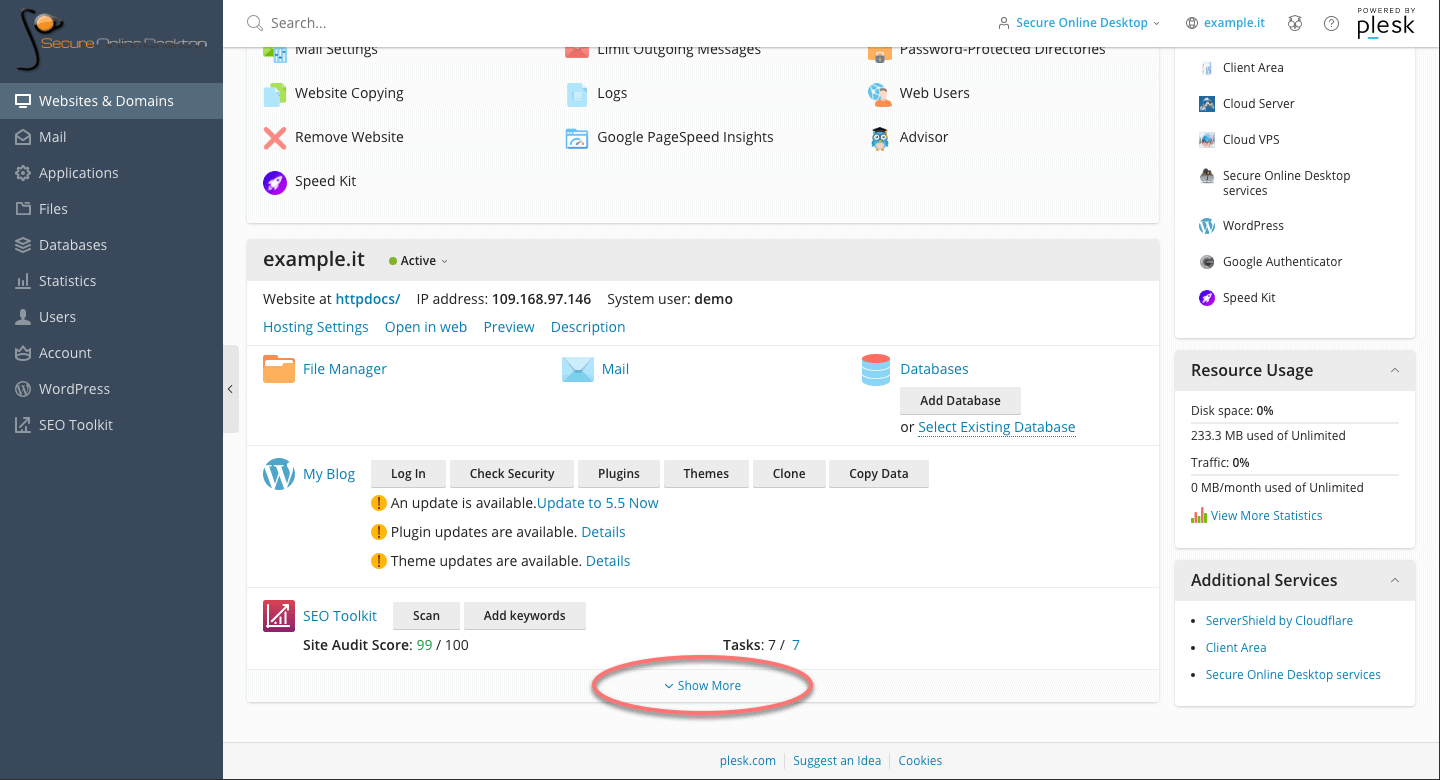
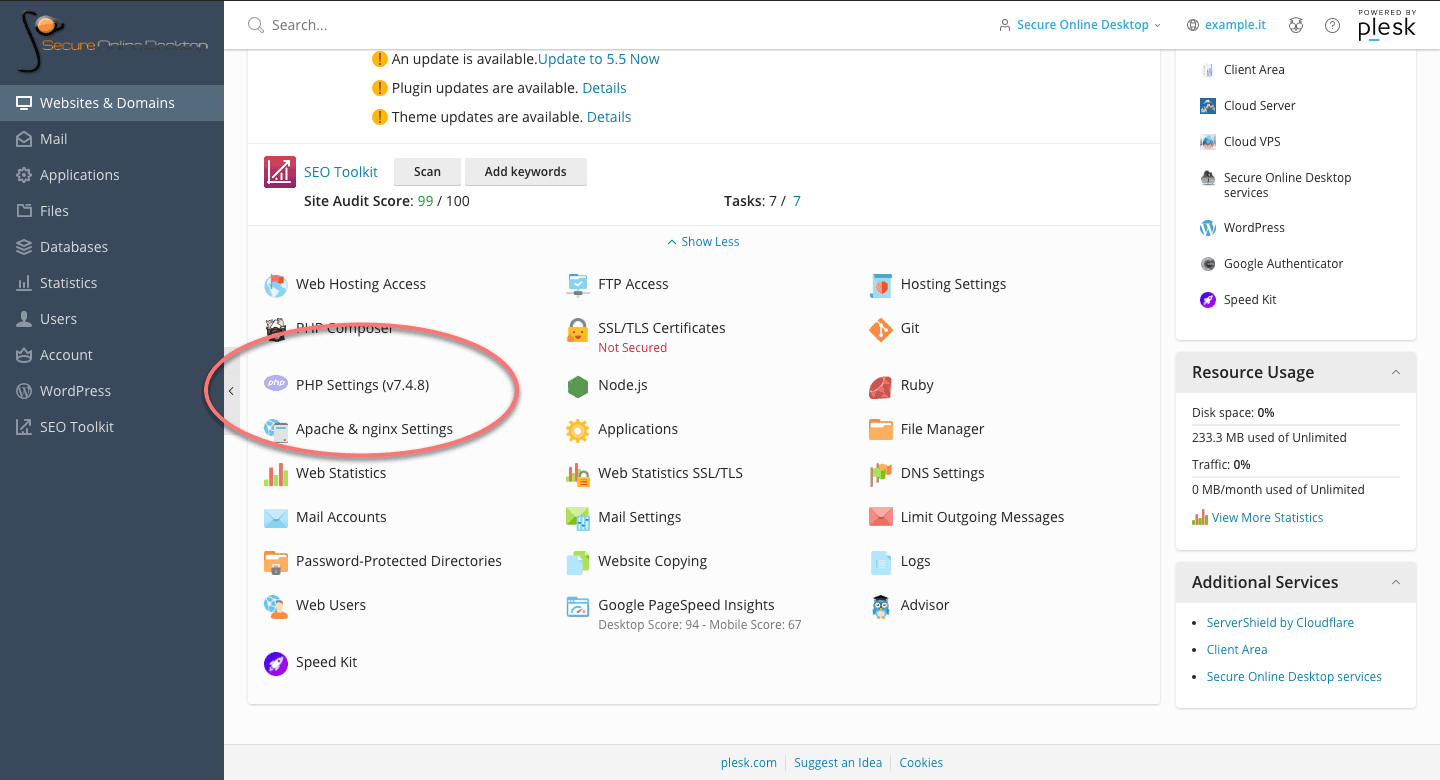
Among the options, look for the one called “PHP Settings”. Note that the version currently in use by the server is already shown next to the name. Click on the option to land on the PHP settings page.
Within the PHP section, it is possible, through a drop-down menu, to change the version in use. Versions that are no longer updated are marked as “outdated”, but still selectable.
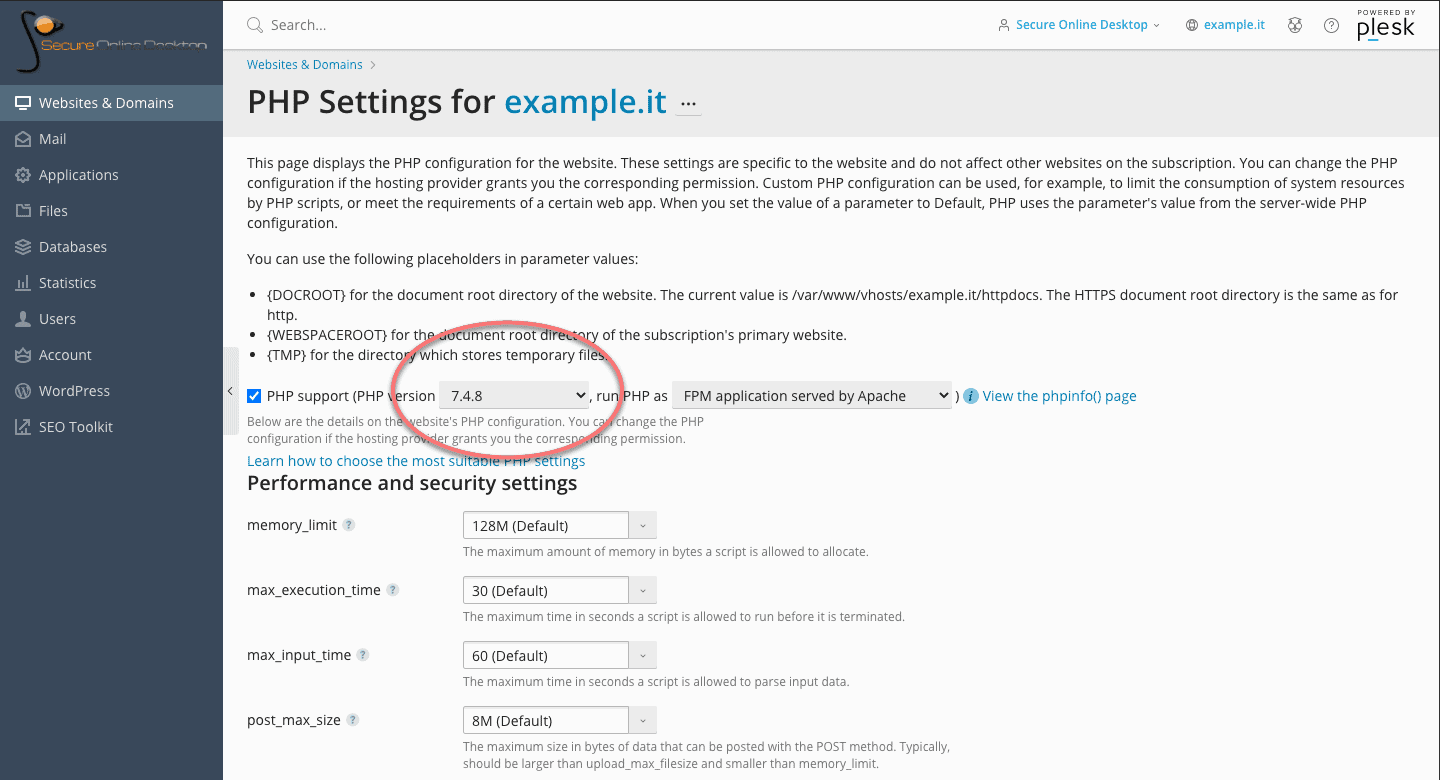
On the page, in addition to the version active on the server, it is possible to modify many other PHP options relating to performance and security. For example the limit of the dedicated memory, the maximum execution time of the scripts, the location of the scripting folders and so on.
These are all features that the average user does not need on a daily basis, but the fact that such in-depth control of PHP options is available is a plus for the flexibility of the control panel and service.
Make sure your host is using the latest versions of PHP
As we have seen, updating PHP to the supported version is a simple operation to be performed through the appropriate panel of the hosting plan.
A few years ago, a great article titled “Whipping Your Host Into Shape” by Joost de Valk went into detail about how the real problem is that providers don’t adopt recent versions faster and, even if they do, they don’t encourage users to update themselves. Years have passed since that article and I hope that the trend will improve, and that more and more people think about the security of their portals also through the updating of the infrastructure that hosts them.
Through the control panel of SOD hosting plans, keeping the service updated and secure is simple, and updating PHP is just an example of the potential of the panel itself. Check for yourself by accessing a demo of the service.
[btnsx id=”2931″]
Useful links:
Manage WordPress from the hosting panel
Share


RSS
More Articles…
- From Cyberfero to Cyberfero: rebranding of the leading cybersecurity company
- NIS: what it is and how it protects cybersecurity
- Advanced persistent threats (APTs): what they are and how to defend yourself
- Penetration Testing and MFA: A Dual Strategy to Maximize Security
- Penetration Testing: Where to Strike to Protect Your IT Network
- Ransomware: a plague that brings companies and institutions to their knees. Should you pay the ransom? Here is the answer.
- Why IT audit and log management are important for Cybersecurity
- Red Team, Blue Team and Purple Team: what are the differences?
Categories …
- Backup as a Service (18)
- Acronis Cloud Backup (11)
- Veeam Cloud Connect (4)
- Cloud Conference (3)
- Cloud CRM (1)
- Cloud Server/VPS (22)
- Conferenza Cloud (4)
- Cyberfero (15)
- ICT Monitoring (5)
- Log Management (2)
- News (25)
- ownCloud (4)
- Privacy (7)
- Security (203)
- Cyber Threat Intelligence (CTI) (8)
- Deception (4)
- Ethical Phishing (11)
- Netwrix Auditor (2)
- Penetration Test (11)
- Posture Guard (3)
- SOCaaS (65)
- Vulnerabilities (84)
- Web Hosting (15)
Tags
 Unknown Feed
Full Disclosure
- [0day-rubbish] Royal Server 5.04.50529.0 Local privilege escalation to LocalSystem on the execution path without credential override (7.2) September 8, 2026Posted by disclosure via Fulldisclosure on Sep 08TO: fulldisclosure () seclists org SUBJECT: [0day-rubbish] Royal Server 5.04.50529.0 Local privilege escalation to LocalSystem on the execution path without credential override (7.2) FROM: disclosure () 0day-rubbish com ----BODY---- 0day Rubbish Research Team is publicly disclosing a vulnerability in Royal Server 5.04.50529.0. Type: Local privilege escalation to LocalSystem […]
- [0day-rubbish] core-admin 1.0.164 (build 16468) Systemic shell command injection via ineffective quote escaping (8.8) September 8, 2026Posted by disclosure via Fulldisclosure on Sep 08TO: fulldisclosure () seclists org SUBJECT: [0day-rubbish] core-admin 1.0.164 (build 16468) Systemic shell command injection via ineffective quote escaping (8.8) FROM: disclosure () 0day-rubbish com ----BODY---- 0day Rubbish Research Team is publicly disclosing a vulnerability in core-admin 1.0.164 (build 16468). Type: Systemic shell command injection via ineffective quote […]
- [0day-rubbish] OP5 Monitor 9.20 Command injection surviving the CVE-2025-34115 patch (OPT-IN fix ineffective) (8.8) September 8, 2026Posted by disclosure via Fulldisclosure on Sep 08TO: fulldisclosure () seclists org SUBJECT: [0day-rubbish] OP5 Monitor 9.20 Command injection surviving the CVE-2025-34115 patch (OPT-IN fix ineffective) (8.8) FROM: disclosure () 0day-rubbish com ----BODY---- 0day Rubbish Research Team is publicly disclosing a vulnerability in OP5 Monitor 9.20. Type: Command injection surviving the CVE-2025-34115 patch (OPT-IN fix […]
- [0day-rubbish] QuantaStor 6.8.3.018 Command injection in the alert-mail command via the smtpPassword field (8.8) September 8, 2026Posted by disclosure via Fulldisclosure on Sep 08TO: fulldisclosure () seclists org SUBJECT: [0day-rubbish] QuantaStor 6.8.3.018 Command injection in the alert-mail command via the smtpPassword field (8.8) FROM: disclosure () 0day-rubbish com ----BODY---- 0day Rubbish Research Team is publicly disclosing a vulnerability in QuantaStor 6.8.3.018. Type: Command injection in the alert-mail command via the smtpPassword […]
- [0day-rubbish] SmarterMail 100.0.9693 (Build 9693) Antivirus command-line configuration executing as NT AUTHORITY\SYSTEM (7.2) September 8, 2026Posted by disclosure via Fulldisclosure on Sep 08TO: fulldisclosure () seclists org SUBJECT: [0day-rubbish] SmarterMail 100.0.9693 (Build 9693) Antivirus command-line configuration executing as NT AUTHORITY\SYSTEM (7.2) FROM: disclosure () 0day-rubbish com ----BODY---- 0day Rubbish Research Team is publicly disclosing a vulnerability in SmarterMail 100.0.9693 (Build 9693). Type: Antivirus command-line configuration executing as NT AUTHORITY\SYSTEM (CWE-250) […]
- [0day-rubbish] Jitterbit Agent 12.8.1.6 (Docker jitterbit/agent:12.8.1.6) Unauthenticated SOAP with hard-coded credentials leading to OS command execution (9.8) September 8, 2026Posted by disclosure via Fulldisclosure on Sep 08TO: fulldisclosure () seclists org SUBJECT: [0day-rubbish] Jitterbit Agent 12.8.1.6 (Docker jitterbit/agent:12.8.1.6) Unauthenticated SOAP with hard-coded credentials leading to OS command execution (9.8) FROM: disclosure () 0day-rubbish com ----BODY---- 0day Rubbish Research Team is publicly disclosing a vulnerability in Jitterbit Agent 12.8.1.6 (Docker jitterbit/agent:12.8.1.6). Type: Unauthenticated SOAP with […]
- [0day-rubbish] Accurate Online Private Cloud on-prem (current) Unauthenticated Hessian deserialization leading to JNDI remote class loading (9.8) September 8, 2026Posted by disclosure via Fulldisclosure on Sep 08TO: fulldisclosure () seclists org SUBJECT: [0day-rubbish] Accurate Online Private Cloud on-prem (current) Unauthenticated Hessian deserialization leading to JNDI remote class loading (9.8) FROM: disclosure () 0day-rubbish com ----BODY---- 0day Rubbish Research Team is publicly disclosing a vulnerability in Accurate Online Private Cloud on-prem (current). Type: Unauthenticated Hessian […]
- [0day-rubbish] DBxtra .NET 13.1.1.0 Unauthenticated SOAP API to xp_cmdshell code execution (9.8) September 8, 2026Posted by disclosure via Fulldisclosure on Sep 08TO: fulldisclosure () seclists org SUBJECT: [0day-rubbish] DBxtra .NET 13.1.1.0 Unauthenticated SOAP API to xp_cmdshell code execution (9.8) FROM: disclosure () 0day-rubbish com ----BODY---- 0day Rubbish Research Team is publicly disclosing a vulnerability in DBxtra .NET 13.1.1.0. Type: Unauthenticated SOAP API to xp_cmdshell code execution (CWE-306) CVSS: 9.8 […]
- **Subject:** CVE-2026-2035703: Tozed ZLT X300 5G CPE — Unauthenticated Remote Root Code Execution via TR-069 Command Injection (CVSS 9.8) September 8, 2026Posted by Surf free on Sep 08Tozed ZLT X300 5G CPE Router firmware 6.01.3 contains an OS command injection vulnerability (CWE-78) in the TR-069/CWMP client daemon (netcwmpd). The IPPingDiagnostics Host parameter is passed unsanitized into sprintf, which constructs a shell command executed via system_by_root() as root. An attacker operating a rogue LTE base station using […]
- CVE-2026-52307: Stored XSS in 1CMS v5.6 September 8, 2026Posted by 懒-癌-症~ via Fulldisclosure on Sep 08CVE-2026-52307: 1CMS v5.6 Authenticated Stored XSS Vulnerability Vulnerability Description An authenticated stored cross-site scripting (XSS) vulnerability exists in the Column Management component of ClassCMS 1CMS v5.6. Attackers can execute arbitrary web scripts or HTML by injecting a crafted payload into the title field. - Vulnerability Type: Cross Site […]
Customers






Twitter FEED
Recent activity
-
SecureOnlineDesktop
Estimated reading time: 6 minutes L'impatto crescente delle minacce informatiche, su sistemi operativi privati op… https://t.co/FimxTS4o9G
-
SecureOnlineDesktop
Estimated reading time: 6 minutes The growing impact of cyber threats, on private or corporate operating systems… https://t.co/y6G6RYA9n1
-
SecureOnlineDesktop
Tempo di lettura stimato: 6 minuti Today we are talking about the CTI update of our services. Data security is… https://t.co/YAZkn7iFqa
-
SecureOnlineDesktop
Estimated reading time: 6 minutes Il tema della sicurezza delle informazioni è di grande attualità in questo peri… https://t.co/tfve5Kzr09
-
SecureOnlineDesktop
Estimated reading time: 6 minutes The issue of information security is very topical in this historical period ch… https://t.co/TP8gvdRcrF
Newsletter
Products and Solutions
Partners
Cloud Models
News
- From Cyberfero to Cyberfero: rebranding of the leading cybersecurity company May 6, 2024
- NIS: what it is and how it protects cybersecurity April 22, 2024
- Advanced persistent threats (APTs): what they are and how to defend yourself April 17, 2024
- Penetration Testing and MFA: A Dual Strategy to Maximize Security April 15, 2024
- Penetration Testing: Where to Strike to Protect Your IT Network March 25, 2024
Google Reviews


Davvero consigliata !!!!!
In particolare vorrei sottolineare la figura che piu’ racchiude e sintetizza le qualità della Secure Online Desktop , il suo AD Ing. Piergiorgio Venuti, professionista impagabile , sia dal punto di vista tecnico/organizzativo che soprattutto (e non dimeno) come persona , capace di gestire , risolvere e approcciare qualsivoglia attività/problematica, davvero un grande !!!!







Tempi veloci e staff preparato!
Ottima azienda, servizi molto utili, staff qualificato e competente. Raccomandata!read more
Ottimo supportoread more
E' un piacere poter collaborare con realtà di questo tiporead more
Un ottimo fornitore.
Io personalmente ho parlato con l' Ing. Venuti, valore aggiunto indubbiamente.read more


About
© 2024 Cyberfero s.r.l. All Rights Reserved. Sede Legale: via Statuto 3 - 42121 Reggio Emilia (RE) – PEC [email protected] Cod. fiscale e P.IVA 03058120357 – R.E.A. 356650 Informativa Privacy - Certificazioni ISO